
CoPilot GPS Navigation
Trimble MAPS Ltd.Maps & Navigation
3.36.06K Reviews
- Version
- 11.4.0.1906
- Installs
- 5.00M
- Age Rating
- Everyone
Screenshots
Our Review of CoPilot GPS Navigation
 Analysis by Appyee
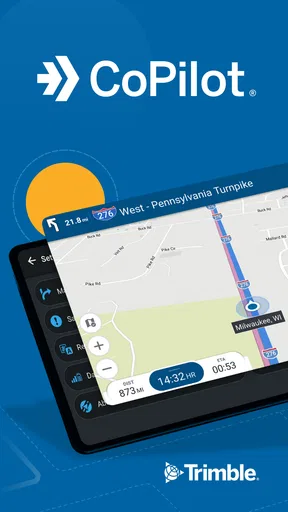
When I plan a drive, I want to know more than where the next turn is. I need a route I can trust when the signal drops, instructions I can follow without staring at the screen, and a quick way to adjust when the day changes. That’s the kind of problem CoPilot GPS Navigation is built to address. It is a free navigation app from Trimble MAPS Ltd., with a focus on driving by truck, car, and RV. Its maps and vehicle-oriented approach make it worth considering for people who travel beyond familiar city streets, though it is not automatically the best choice for every driver.
Start with the route you actually need
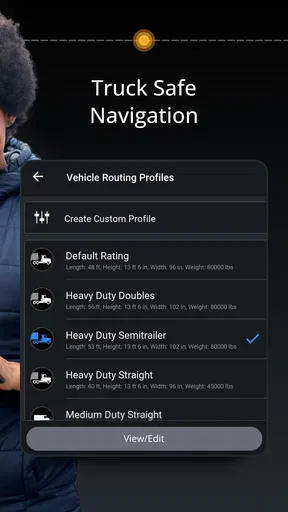
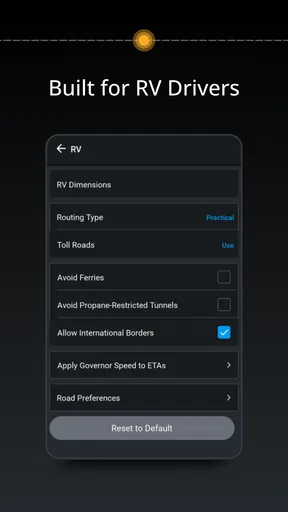
Before setting off, I would treat the vehicle and route preferences as part of the planning, not as setup to rush through. A route that suits a small car may not suit an RV or truck, and choosing the right vehicle type is one of the first practical steps in making the app useful. If you regularly switch vehicles, it is worth checking those settings again before a trip rather than assuming the last route profile still fits.
For a weekend drive through an area with patchy reception, I would prepare the map while connected, then look over the route and any planned stops before leaving. That small bit of preparation changes the role of an offline navigation app: it becomes a backup for the whole journey rather than a tool you only open after the signal has disappeared. I would also keep a charging cable within reach, since navigation on a long drive can put a noticeable demand on a phone battery.
That preparation matters especially for RV and truck drivers, who may need routes suited to a larger vehicle rather than the shortest line between two points. The app’s vehicle choices give it a more specific purpose than a basic map viewer. Still, I would not assume that selecting a vehicle profile removes the need to use judgement. Road restrictions, temporary closures, and local conditions can change, so checking signs and following current road instructions remains essential.
Plan first, then let the app guide the drive
Once a destination is entered, the app can help shape a trip with multiple stops instead of treating each leg as a separate navigation session. That is useful for a day with errands, deliveries, or a planned break: set the destinations in order, review the route, and make sure the sequence reflects how you intend to travel. I find this more dependable than adding stops hurriedly while already on the road.
A realistic example would be a family drive from home to a campground, with a grocery stop along the way and a second stop to meet someone. Planning those points together can make it easier to understand the overall route before departure. If plans change, I would pull over somewhere safe before editing the itinerary. A navigation screen is most helpful when it reduces distraction, not when it encourages last-second tapping in traffic.
The same workflow can suit a driver covering several appointments, but there is a trade-off: route optimization is only as useful as the stops and preferences entered. If the order matters for reasons the app cannot infer—such as a timed pickup or a preferred break location—I would arrange the stops deliberately and inspect the result instead of accepting a suggested order without thought.
Offline maps and the handoff from planning to driving
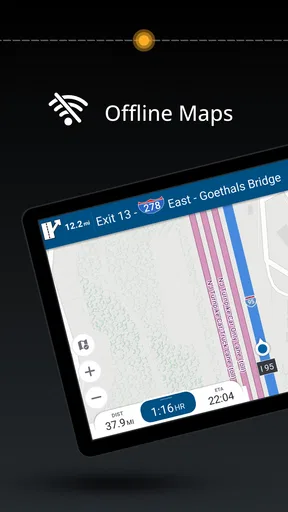
Offline maps are a central reason I would look at this app. Downloading the area before departure can make navigation more practical in places where a mobile connection is unreliable. It can also help travelers avoid depending on data while crossing unfamiliar areas. The important handoff is from preparation to the actual drive: confirm the relevant map is available before leaving, then rely on the spoken guidance and glance at the screen only when it is safe.
Offline navigation is not the same as having every live service available everywhere. I would plan around the map and route I have prepared, rather than assuming an offline setup can respond to every new road condition in the same way as a connected service. If I need to change destinations mid-trip, I would do so when parked and allow time to check the revised route.
This is where CoPilot’s focus differs from the usual phone map apps. Google Maps and Apple Maps are familiar choices for everyday directions and quick searches, while CoPilot’s appeal is more about preparing a driving route and having maps ready when connectivity is a concern. I would choose based on the trip: for a short local journey with a reliable connection and frequent place searches, a standard maps app may feel quicker; for a longer drive where offline preparation and vehicle selection matter, CoPilot deserves a closer look.
What the drive feels like—and where it can snag
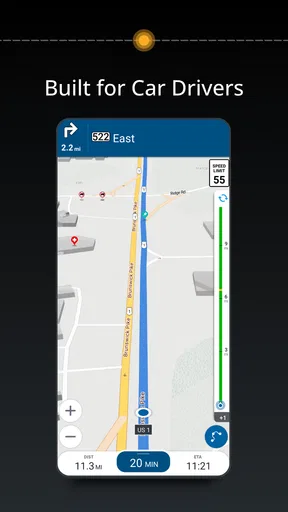
Once underway, lane guidance can be valuable in dense traffic, where knowing which lane to aim for before an exit is more useful than receiving a last-second turn instruction. Voice directions also help keep attention on the road. I would set the volume and preferred voice before starting, then leave the phone mounted where it can be checked briefly without taking focus away from driving.
Traffic updates can help when choosing between a clear route and one slowed by congestion, but no navigation app can make traffic predictable. I would treat a suggested alternative as information to weigh, not a command. A detour may save time, but it can also take a driver onto unfamiliar streets or disrupt a carefully planned stop sequence. That judgement is especially important in a larger vehicle.
Search is one place where the experience may feel less forgiving. If a destination does not appear immediately, I would try a fuller address or check the spelling rather than repeatedly tapping near the keyboard while moving. It is a small but meaningful planning habit: find the destination before departure, confirm that it is the intended place, and only then start guidance.
Who is likely to get the most from it?
I see the strongest fit for drivers who take longer trips, travel through areas with weak service, or want to set up a route around a truck, car, or RV. It can also make sense for someone who likes to decide on stops in advance rather than improvise every leg from a search bar. On the other hand, a person who mostly walks, uses public transport, or needs a map mainly for discovering nearby places may be better served by a broader everyday maps app.
There is also a practical ownership question. The app is free to install and is rated for everyone, but it offers in-app purchases ranging from $5.99 to $119.99 per item. I would check what is included in the version and options I intend to use before building a travel routine around it. Its average rating is 3.0 from around 106,000 ratings, with about 6,000 written reviews, and it has been installed over 5 million times. Those figures suggest a widely tried app with mixed reactions, so I would test it on a familiar route before depending on it for an important journey.
CoPilot GPS Navigation was released on May 2, 2012, and its current version is 11.3.0.1882, with Android 7.0 as the minimum operating system. Those details may matter when deciding whether an older phone can run it, but compatibility alone does not tell me how smoothly it will behave on a particular device. I would install it, check the map preparation and route setup at home, and then use it for a low-pressure trip before relying on it for a long haul.
One less obvious trade-off is that offline preparation asks for a little discipline. It is not enough to remember that offline maps exist; the route area needs to be ready before the phone loses service. I would build that check into the night-before routine, alongside confirming the destination and charging the phone. This approach is more useful than discovering a missing map after leaving coverage.
Another is the balance between advance planning and flexibility. Multiple stops can make a day easier to organize, but a route with many additions is also harder to edit safely on the move. I would group the trip into sensible legs, keep the next stop clear, and make any substantial changes while parked. That keeps the app doing the navigation work without turning the phone into another task competing for attention.
First Impressions
Opening up CoPilot GPS Navigation for the first time, I was immediately impressed by its sleek and user-friendly interface. It's like having a co-pilot that’s always ready to help, minus the need for coffee breaks. The app’s setup is straightforward, guiding you through personalization options without any fuss. You can customize everything from the type of vehicle you’re driving to your preferred route settings. It’s all about making your journey as smooth as possible.
Features That Stand Out
One of the first things I noticed was the offline maps feature. Yep, you heard it right—no internet, no problem! This is a lifesaver when driving through remote areas where cell service is as elusive as a unicorn. Just download the maps you need ahead of time, and you’re good to go. It’s perfect for international travel as well, avoiding those pesky roaming charges.
Another neat feature is the lane guidance. It’s incredibly helpful in busy city traffic where missing a turn can mean a detour worthy of a mini road trip. The app tells you exactly which lane to be in, and it’s surprisingly accurate. I’ve tested it in a few urban jungles, and it’s like having a personal navigator whispering in your ear.
User Experience
Using the app on the road is a breeze. The voice navigation is clear and concise, almost like having a calm friend beside you who never yells. You can choose from various voice options, which is a fun little touch. Plus, the real-time traffic updates are a game-changer, helping you avoid those gnarly traffic jams that can turn any road trip into a test of patience.
What’s really cool is the trip planning feature. You can set multiple stops, and the app optimizes your route to save you time and fuel. It's like having a personal travel agent in your pocket. And for those with a green thumb for efficiency, it even tracks your fuel usage and carbon footprint. How’s that for eco-friendly?
What Could Be Better
Now, as much as I love CoPilot GPS Navigation, it’s not without its quirks. The app’s search function can be a bit finicky at times, requiring exact spellings or addresses. It’s not a deal-breaker, but can be a tad frustrating when you’re used to the forgiving nature of some other apps.
Another point to consider is the app’s battery consumption. It’s not exactly gentle on your phone’s battery life, especially when running those offline maps. So, make sure you have a charger handy if you’re planning a long trip.
Final Thoughts
All in all, CoPilot GPS Navigation is a solid choice for anyone looking to enhance their driving experience. The offline maps alone make it worth checking out, especially for frequent travelers. While there are a few minor hiccups here and there, the app’s robust features and reliable performance more than make up for it.
If you’re in the market for a dependable navigation app that feels like a trusty sidekick, give CoPilot GPS Navigation a spin. It might just be the co-pilot you’ve been searching for. Safe travels, and may your journeys always be filled with adventure!
Verdict
Strengths of CoPilot GPS Navigation
- Intuitive user interface simplifies navigation.
- Offline maps save data and battery life.
- Real-time traffic updates enhance trip planning.
- Multiple route options for flexibility.
- Voice-guided directions keep driving hands-free.
Limitations of CoPilot GPS Navigation
- Premium features require a subscription.
- Limited map updates in some regions.
- Occasional app crashes reported by users.
- Heavy battery usage during long trips.
- Lacks integration with some external apps.
Similar Picks in This Category
View All
Uber - Request a ride
Uber Technologies, Inc.4.7


inDrive. Rides with fair fares
® SUOL INNOVATIONS LTD4.8

Yandex Go: Taxi Food Delivery
Mikromobilnost LLC Belgrade4.8

Bolt: Request a Ride
Bolt Technology4.8

Rapido: Bike-Taxi, Auto & Cabs
Rapido Bike Taxi4.8
Frequently Asked Questions
What features does CoPilot GPS Navigation offer?
CoPilot GPS Navigation provides a range of features including offline maps, turn-by-turn voice directions, and real-time traffic updates. It also offers route planning with multiple stops, lane guidance, and speed limit alerts. Users can customize their routes and save frequent destinations for quick access.
Is CoPilot GPS Navigation available offline?
Yes, CoPilot GPS Navigation allows users to download maps for offline use. This means you can navigate without an internet connection, which is particularly useful in areas with poor connectivity or while traveling abroad. Ensure you download the necessary maps in advance to take full advantage of this feature.
How does CoPilot GPS Navigation handle traffic updates?
CoPilot provides real-time traffic updates to help you avoid congestion and find the fastest routes. The app uses live traffic data to suggest alternative routes, ensuring timely arrivals. However, real-time traffic features require an active internet connection, even if the maps are used offline.
What platforms support CoPilot GPS Navigation?
CoPilot GPS Navigation is available on both Android and iOS platforms. Users can download the app from the Google Play Store or the Apple App Store. The app is designed to work seamlessly across different devices, ensuring a consistent experience whether you use a smartphone or tablet.
Are there any subscription costs or in-app purchases in CoPilot GPS Navigation?
While CoPilot GPS Navigation offers a free basic version, certain features like live traffic updates and premium maps require a subscription. Users can choose from various plans based on their needs. In-app purchases also allow for additional map regions or features, enhancing the overall navigation experience.
